AI Browser Assistant lives in your browser sidebar and helps you navigate any website, complete step-by-step walkthroughs, fill forms, edit PDFs, work with Google Docs & Sheets, and get instant answers — all hands-free with voice input and spoken guidance.
No account required · Works on any website · Free to start
Real screenshots of AI Browser Assistant guiding users through tasks on live websites.
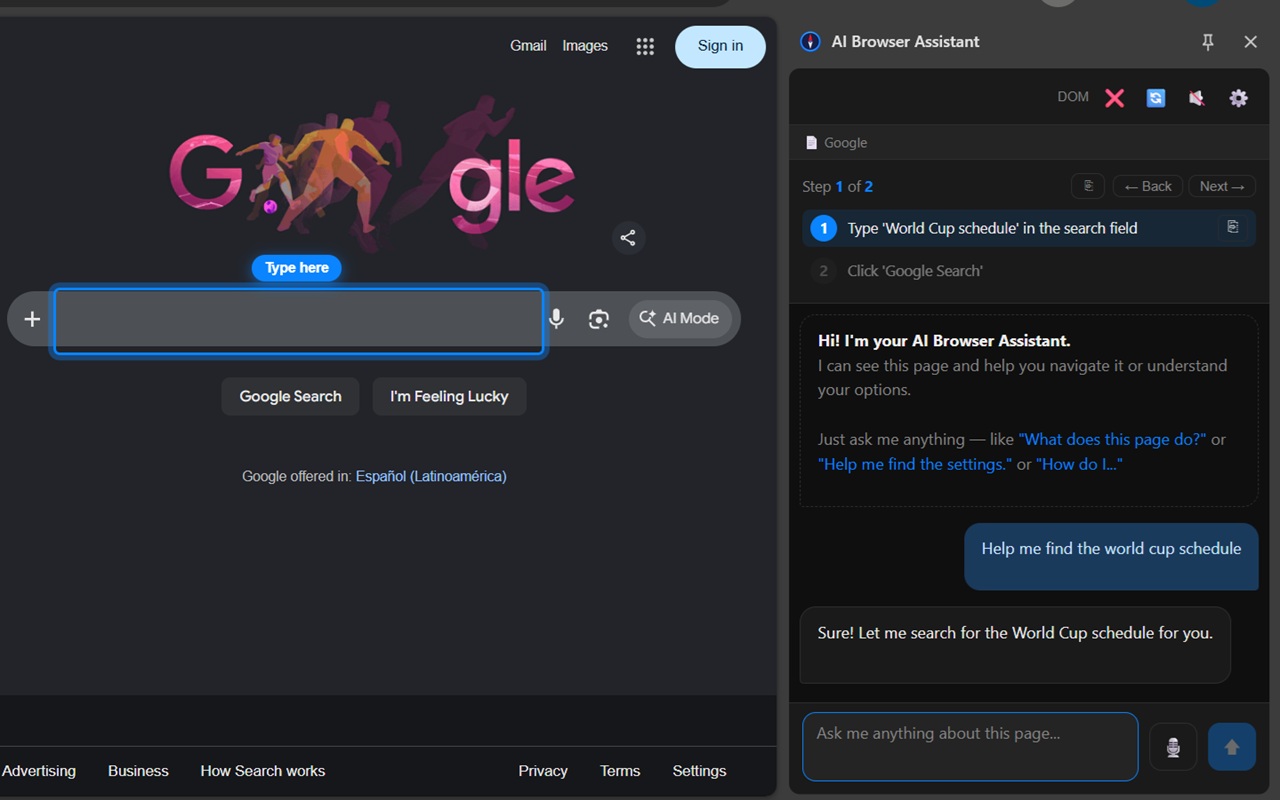
Ask a question and the AI highlights exactly where to type or click
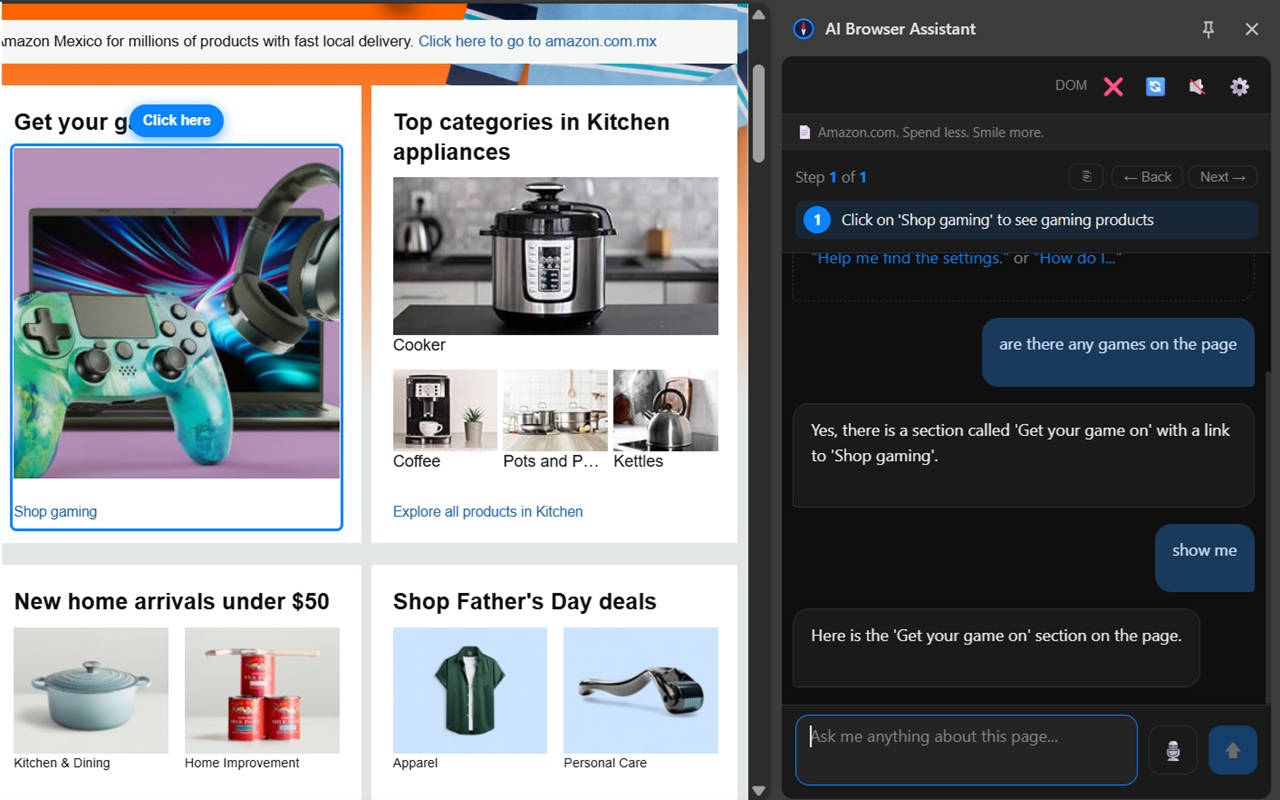
The AI finds and points to what you're looking for on any website
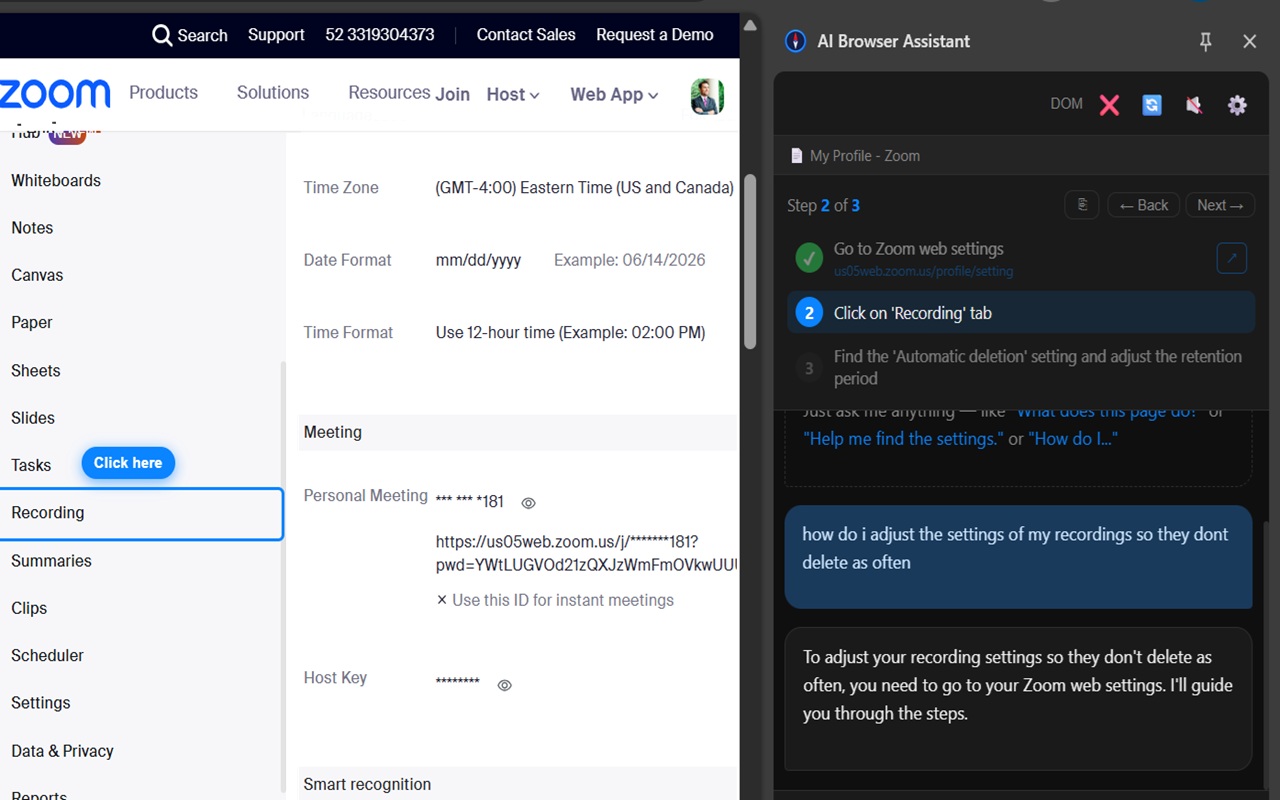
Step-by-step guided walkthroughs through complex settings on any platform
From confusing government portals to complex checkout flows, your AI browser assistant handles it — on any website, instantly.
Lost on an unfamiliar website? Describe where you need to go in plain English. The AI reads the page and guides you there — highlighting the exact link, button, or menu to use.
Multi-step online processes made simple. The AI breaks any task into clear, numbered steps and highlights exactly what to do next — no more second-guessing.
Confusing forms, government applications, insurance claims — the AI walks you through every field one step at a time and explains what each one means.
Open any PDF directly in your browser. Highlight text, add annotations, draw freehand, insert images, add signatures, fill form fields, and download — no third-party apps needed.
Tap the microphone and speak your question — no typing required. The assistant reads its responses and step instructions aloud. Fully hands-free from question to completed task.
Summarize documents, navigate to sections, explain formulas, find cell values, and get guided help — all while staying on your Google Doc or Sheet.
Ask the AI to explain what a page does, summarize long content, find specific information, or identify the next action to take — instantly.
Medicare, IRS, DMV, Social Security, passport renewals, benefits applications — the AI navigates bureaucratic websites so you don't have to figure it out alone.
Just ask in plain English — no commands to learn. The AI understands natural language and responds with specific, actionable guidance tied to the exact page you're on.
Three steps. No technical knowledge required. Works on any website.
Click the AI Browser Assistant icon in your Chrome toolbar. Type what you're trying to accomplish in plain English — "help me apply for a passport renewal," "find the cancel subscription button," or "summarize this page."
The AI reads the live content of your current page, understands its layout and purpose, and instantly generates a personalized step-by-step action plan tailored to your exact situation.
The AI automatically scrolls to the exact section of the page you need and places a clear visual highlight directly on the button, field, or link to interact with. Each highlight shows a label — "Click here", "Type here", "Select this" — so there's zero guesswork. Confirm each step and the AI moves to the next one automatically.
Open any PDF directly in Chrome — no downloads, no third-party apps. A full editing suite plus AI-guided walkthroughs, all in one place.
AI Browser Assistant understands your Google Workspace documents — ask questions, navigate sections, and get guided help without leaving the page.
From question to completed task without touching your keyboard. Voice input and text-to-speech make AI Browser Assistant accessible to everyone.
Tap the microphone button and speak your question out loud — no typing required. The assistant transcribes your voice and responds instantly with step-by-step guidance.
The assistant reads its responses and every step instruction aloud so you always know exactly what to do next — even if you can't look at the screen.
Each step highlights the exact element on the page — button, field, link — and labels it with a clear action caption so you never have to guess where to click, tap, or type.
Switch tabs and the assistant follows you. Ask questions on one tab, get guidance on another — the AI always knows which page you're on and adapts instantly.
Anyone who wants to accomplish more online — faster, with less frustration, and without needing to be a tech expert.
Navigate Medicare portals, online banking, government benefit sites, and social media with total confidence. The AI is patient, precise, and always shows you exactly what to do next.
No time to figure out unfamiliar software platforms, procurement portals, or enterprise tools. Get instant step-by-step guidance on any SaaS product or web application.
Quickly analyze web pages, summarize academic content, navigate library databases, and complete online enrollment or financial aid processes without confusion.
Websites in your non-primary language are no longer a barrier. The AI explains what pages mean and guides you through tasks in plain, clear terms — regardless of the site's language.
Book appointments, navigate patient portals, complete insurance claim forms, and understand medical information online — with clear AI guidance every step of the way.
Find the best deals, navigate complex checkout processes, apply promo codes, manage returns, and compare products — with an AI guide that keeps you on track.
AI Browser Assistant brings the power of AI directly into your Chrome browser — no switching tabs, no copy-pasting, no frustration.
AI Browser Assistant doesn't just tell you what to do — it shows you. Each step places a glowing highlight directly on the exact element to interact with, labeled with a clear action: "Click here", "Type here", or "Select this". The page automatically scrolls to the right section so you never have to hunt. No reading walls of instructions. Just look at what's highlighted and act.
Guided task completion means the AI doesn't just answer your question — it breaks your goal into concrete steps and walks you through each one visually on the actual web page. Whether it's a 3-step checkout or a 15-field government form, the AI stays with you from start to finish, highlighting each next action in sequence.
Ask the AI to analyze any page and it instantly extracts the relevant information — key facts, navigation options, form fields, pricing, terms, and more. It's like having a research assistant who has already read every word on the page and can answer your questions about it in seconds.
AI Browser Assistant is not limited to a specific set of sites. It works on government portals, banking websites, insurance platforms, healthcare systems, e-commerce stores, travel booking sites, SaaS tools, social networks, educational platforms, and more — any page you can open in Chrome.
AI Browser Assistant speaks your language. The interface is fully localized so users around the world can get AI-guided help in their native tongue.
No matter where you are or what language you speak, AI Browser Assistant guides you through the web in your own words.
Everything you need to know about AI-powered browser assistance.
An AI browser assistant is a Chrome extension that uses artificial intelligence to guide you through websites step by step. It can highlight buttons, help fill forms, analyze pages, summarize content, and walk you through complex tasks hands-free — all while reading the live page you're on.
You describe what you want to do in plain English. The AI reads the current page, breaks the task into steps, and visually highlights exactly what to click or fill in — like having a personal guide living inside your browser tab.
Guided task completion means the AI breaks a complex multi-step online process into individual highlighted steps and walks you through each one in sequence. You always know exactly what to do next — no guessing, no getting lost.
Yes. AI Browser Assistant works on virtually any website — government portals, e-commerce, banking, healthcare, travel, SaaS tools, social networks, and more. It adapts to whatever page you're on in real time.
Yes. AI Browser Assistant is particularly powerful for form filling. It identifies each field, explains what information is needed, and guides you through the form one field at a time — from simple contact forms to complex multi-page government applications.
Yes — you can install and start using AI Browser Assistant completely free from the Chrome Web Store. Optional token packs are available for users who need more AI interactions per month.
ChatGPT doesn't know what page you're on. AI Browser Assistant reads your live page in real time and highlights the actual elements you need to interact with. It's the difference between asking a friend for directions vs. having them sit next to you and point at the screen.
Absolutely. AI Browser Assistant was designed with accessibility in mind. It's ideal for seniors and anyone who finds websites confusing — Medicare portals, bank websites, email platforms, and more. The AI provides calm, clear, visual guidance at every step.
Yes. AI Browser Assistant only reads the current page when you actively ask it for help. It does not track your browsing history, store personal data, or monitor your activity in the background.
AI Browser Assistant is currently available as a Chrome extension on the Chrome Web Store. Support for additional Chromium-based browsers is planned.
Yes. AI Browser Assistant includes a full built-in PDF editor. You can highlight text, add annotations, draw freehand, insert images, add signatures, fill out PDF form fields, and download the edited PDF — all directly in Chrome without any third-party apps.
Yes. AI Browser Assistant understands Google Docs and Google Sheets. You can ask it to summarize a document, navigate to a section, explain a formula, find a cell value, and more — all without leaving the page.
Yes. AI Browser Assistant supports voice input (speech-to-text) so you can speak your questions without typing. It also includes text-to-speech so the assistant reads its responses and step instructions aloud — fully hands-free from question to completion.

Install in seconds. No account required. Works on any website instantly.
Add to Chrome — Free
